Managers and finance people always want to know how much a project costs. Here’s a quick copy-paste query you can run to estimate storage cost.
/* Set your cost per GB per month*/
DECLARE monthlystoragecostperGB NUMERIC DEFAULT 0.02;
 SELECT
    table_id AS Table_Id,
    TIMESTAMP_MILLIS(creation_time) AS Creation_Time,
    TIMESTAMP_MILLIS(last_modified_time) AS Last_Modified_Time,
    FORMAT("%'d", row_count) AS Row_Count,
    /* BQ storage MB is 1024*1024, not 1,000,000 */
    ROUND(size_bytes/(1024*1024),1) AS Data_Size_MB,
    (monthlystoragecostperGB/1024)*ROUND(size_bytes/1000000,1) AS costpermonth,
    IF (type=1, "TABLE", "VIEW") AS Type
 /* Insert your project and dataset */
 FROM \`myproject.COVID.__TABLES__\`
Use DataStudio and build a report on the results like this one, and have it delivered regularly and automatically. Running queries on BigQuery metadata are free, by the way.
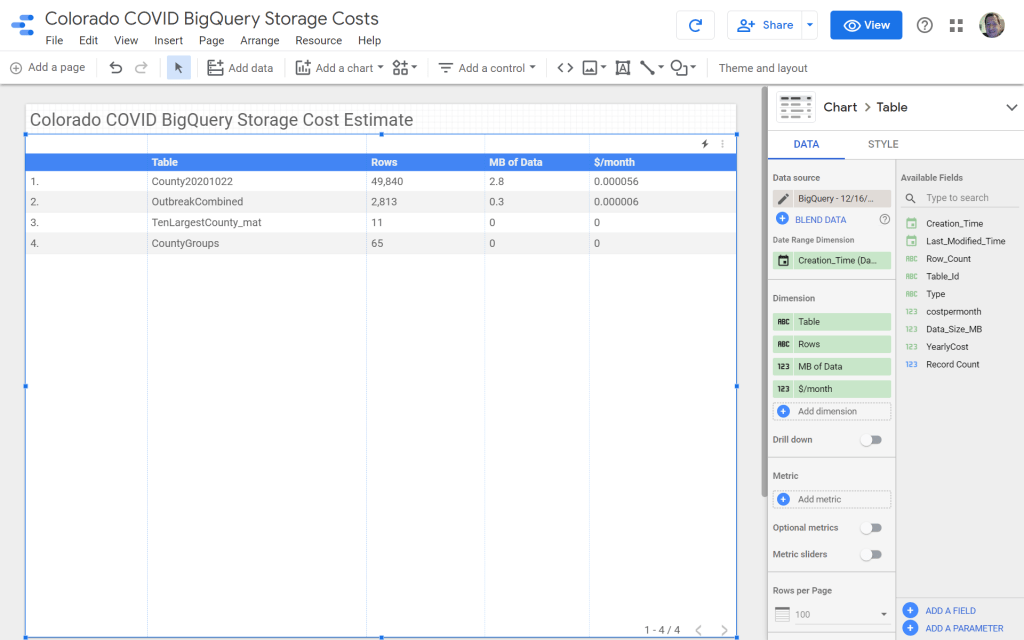
That’s my side project where I work with state COVID data. The storage costs are essentially nothing.
A few notes:
- This query over-estimates costs. When a data partition is unchanged for 90 days, the storage costs drop by half.
- External tables – one of my COVID tables lives in Sheets – show up as views instead of tables in the query results. Any storage cost is recorded elsewhere.
- TenLargestCounty_mat is a materialized view and uses a tiny, tiny amount of real storage.
Want an update when I share how to estimate query costs or provide other useful tips?
Sign up and I’ll email you! I don’t share your email with anyone, and you can unsubscribe anytime.
Processing…
Success! You're on the list.
Whoops! There was an error and we couldn't process your subscription. Please reload the page and try again.
 Useful data analysis techniques and results